
That’s not an exaggeration. It’s what happens when business processes are properly automated. Right now, somewhere in your organisation, someone is copying data from one sheet to another manually, building the same report from scratch every month, cross-referencing two files by eye to find mismatches, or managing inventory in a spreadsheet that needs four people to update.
Every one of these tasks can be automated. Most of them can be fully automated in Excel — using tools your company already owns. I help businesses across India identify these manual processes and eliminate them using Excel Macros, VBA, Power Query, and Power Automate — built specifically for your workflows, your data, and your team.
Replace manual monthly, weekly, and daily reports with automated Excel dashboards. One click — or no click at all — generates your complete report from updated source data. Typical time saved: 3–8 hours per week per person.
Custom Macro scripts that perform complex, repetitive tasks instantly — data consolidation, formatting, filtering, email generation, file saving, and more. Built in plain, maintainable VBA code.
Eliminate manual data entry and the errors that come with it. Power Query pipelines clean, transform, and consolidate data from multiple sources automatically — every time you refresh.
Automated invoice generation, payment tracking dashboards, and outstanding receivables reports — built directly in Excel without expensive third-party tools.
Real-time inventory tracking, reorder alerts, stock reconciliation, and supplier performance dashboards — all automated in Excel for SMEs that don’t need a full ERP system.
Automated attendance tracking, payroll calculation, leave management, and headcount reporting — freeing your HR team from hours of weekly spreadsheet work.

Every Monday morning, your team lead opens five regional Excel files, copies data into a master sheet, formats it manually, creates summary charts, and sends it to management. Total time: 3–4 hours. Errors occur regularly.

A single Macro consolidates all five files, applies formatting, generates charts, and saves as a formatted PDF. Total time: under 3 minutes. Any team member can run it. Identical output every week.

Accounts team manually updates payment status across 80+ vendor entries, cross-checks against bank statements, and emails overdue reminders individually. 6+ hours per week.
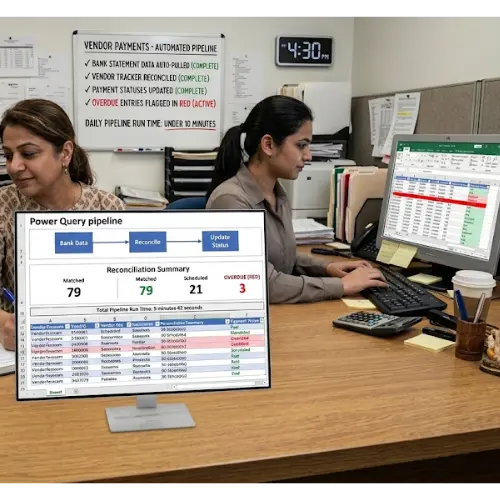
A Power Query pipeline pulls bank statement data, reconciles against the vendor tracker, updates payment status automatically, and flags overdue entries in red. Runs in under 10 minutes.
Workflow automation, custom functions, report generation
Data transformation, cleaning, multi-source consolidation
Cross-app automation, email triggers, file workflows
Advanced dashboards and interactive reporting
Automation for Google Workspace-based teams
Large-scale data automation and processing

30–60 minute session to understand your current manual workflows. No commitment required.

A prioritised list of every automatable process identified, with estimated time savings and implementation effort for each.

I build the automation solution and deliver it with full documentation. Designed to work for any team member — no coding knowledge needed.

I train relevant team members to operate, maintain, and update the automation, so you’re not dependent on an external expert indefinitely.

Structured support window after delivery ensures any issues or changes are addressed promptly.

a year ago
Your Excel training is excellent and very informative. It will help to our skills and insights to work efficiently and effectively with data.. Special thanks to Venkat for understanding doubts and clarifying with explanation..

a year ago
Venkat Sir Advanced Excel live training was exceptional! His clear explanations, in VLOOKUP practical examples, and interactive approach made complex concepts easy to grasp. The session was well-structured, highly engaging, and packed with valuable insights.
Thank u so much for your valuable time..

a year ago
I had a great learning experience with this course! The structure was well-designed, starting from the basics and progressing to advanced Excel, making it easy to follow. Venkat Sir was polite, patient, and an amazing instructor who explained concepts clearly. Highly recommend this course to anyone looking to improve their Excel skills!
Excel automation uses built-in tools like Macros, VBA scripts, and Power Query to perform repetitive tasks automatically — without manual input. Instead of copying, formatting, and calculating data by hand, your team triggers a process and gets the finished output within seconds or minutes. The result: reduced manual effort, fewer errors, and significant time savings.
No. Once the automation solution is built and delivered, your team members operate it with minimal technical knowledge — typically just clicking a button or refreshing a connection. I design all solutions for non-technical users and provide training specifically for this.
Simple automations typically take 1–3 working days. Complex, multi-process automation systems may take 1–3 weeks. Timeline is discussed and agreed upon before any engagement begins.
Excel Macros (VBA) automate tasks within Excel itself — data manipulation, formatting, report generation. Power Automate works across applications — it can trigger Excel processes when an email arrives or a file is uploaded. I advise on the right approach for your specific workflow.
Absolutely. Small businesses often benefit the most because every hour of manual work represents a higher proportion of total capacity. I have built automation solutions for businesses as small as 3 people that delivered significant time savings within the first week.
All solutions are delivered with documentation and your team is trained to manage basic updates. Ongoing support can be arranged for more significant changes. I build solutions with maintainability in mind — clean, commented code rather than complex systems no one else can understand.